
M3E Canvas
lnkiai.github.io
Browser sketchpad for Material 3 Expressive screens that turns your mockup into a prompt for AI coding tools.
- Pricing
- Open source
- Published
- Nov 18, 2026
Next steps
- Antidraw
Both tools are listed under AI Code Generator and AI UX Design.
- UI SDK
Both tools are listed under AI Code Generator and AI UX Design.
- AI Website Cloner Template
Both tools are listed under AI Code Generator and Open Source.
- turri
- Diagram Design
- Astryx
What it does
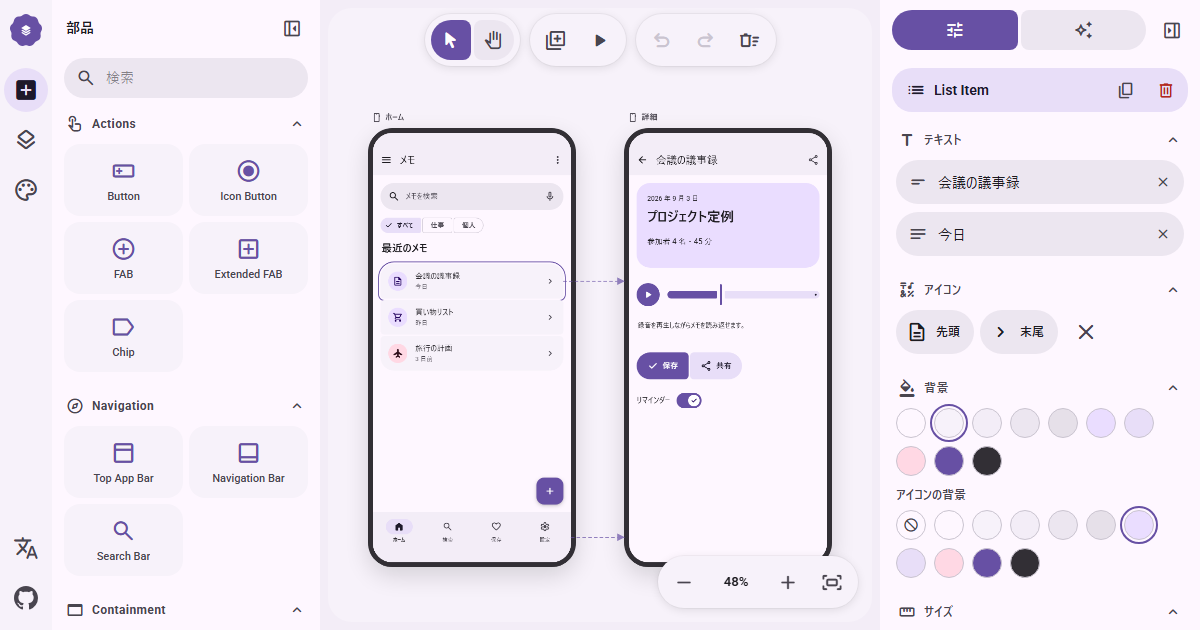
M3E Canvas lets you drag real Material 3 Expressive components (buttons, FABs, bars, tabs, cards, lists, sheets, pickers, carousels and more) onto phone or desktop screens that snap to a 4dp grid. Link components to screens and press Preview to tap through the flow with transitions, set theme color, shape, type and motion in one place, then copy the whole design as a short brief in your language to paste into Claude Code, Codex, Gemini CLI or Cursor. It runs entirely in the browser with no account or server, and is free and open source under MIT.
Use cases
- Sketch app screens from real Material 3 Expressive components and turn them into a prompt for Claude Code, Codex, Gemini CLI or Cursor
- Click through a multi-screen flow with transitions before asking an AI tool to build it
- Set color, shape, type and motion themes once and keep generated UI consistent
Frequently asked questions
- What is M3E Canvas?
- A free, open-source sketchpad for app screens built from Material 3 Expressive parts. Your sketch becomes a precise prompt for an AI coding tool.
- Do I need an account?
- No. It runs entirely in the browser with no account, server or install.
- Which AI tools work with the prompt?
- Any tool that takes a prompt; the README names Claude Code, Codex, Gemini CLI and Cursor.
- Is it free?
- Yes, MIT licensed.